Everything looks like a nail
For Large Language Models (LLMs), Frontier aka "State of the Art" (SOTA) Models provided by big vendors like OpenAI and Anthropic and Google continue to add capabilities at a wondrous rate. Yet there's a very strong case for running LLMs locally, much like every smart phone provides a powerful computer your pocket.
As an example: helicopters can cover in 15 minutes what takes 2 hours by car, but the overhead and extra considerations (fuel, pilots, landings, weather sensitivity, etc.) makes them impractical for routine tasks like picking up kids from school.
(Though those new autonomous drones can carry pretty heavy loads ;)
Given English has ~170,000 words but the average working vocabulary is 30,000 words, and specific domains like "email" (Hello! Best Regards,) are even more narrow and formulaic... Do you need a model trained on the entirety of human knowledge with latency from expensive GPU clusters?
Writing code is specialized due to its utilitarian nature; it has even more structure, repetition, and rules - especially if it's type-checked and compiled.
How they work together
In software, experienced engineers propose and design the architecture, whereas less experienced people do the (simpler parts) of implementation - specialization based on skill and scope.
Frontier models can design and orchestrate, handle the unusual, while local models do specific, simple things well.
Software engineers have learned to have a "plan" or "write a spec" phase specifically created with an advanced LLM, and that a local LLM can write out the code and tests for small well defined components.
Inevitable and Resilient
In 2020 an LLM was a research project and by 2024 it's running on your laptop (or smartphone!). Hardware gets better and costs go down which induces "Jevons Paradox" https://en.wikipedia.org/wiki/Jevons_paradox ; as people adapt they'll use LLM inference non-stop.
Moreover, users (and businesses!) dependent to always having AI will balk at "cloud outages" or "AI outages" - thus a real need and demand for local LLMs.
(Have you ever seen people struggling to function without mobile phone signal/reception ;)
And I didn't even bring up the privacy and security arguments...
We don't use Helicoptors for everything; use the right tool for the job.
Hands On with MLX - install
Apple's silicon architecture of "unified memory" is convenient for those trying out "Local LLMs" - and not buying a separate dedicated server with a GPU.
brew install uv
uv --version
mkdir llm-demo
cd llm-demo

uv venv

## this installs mlx as it's a dependency of mlx-lm
uv pip install mlx-lm

## optional sanity checks - using explicit calls with the local uv
uv pip list
uv run python -c "import mlx; import mlx.core as mx; print('mlx ok', mx.__version__)"
uv run python -c "import mlx_lm; print('mlx_lm ok')"
Run that LLM with MLX
The following command will both download the model and then load it into memory along with sending it the prompt:
uv run mlx_lm.generate --model mlx-community/Meta-Llama-3.1-8B-Instruct-4bit --prompt "tell me a joke"
A man walked into a library and asked the librarian, "Do you have any books on Pavlov's dogs and Schrödinger's cat?" The librarian replied, "It rings a bell, but I'm not sure if it's here or not."
Prompt: 39 tokens, 75.536 tokens-per-sec Generation: 54 tokens, 31.247 tokens-per-sec Peak memory: 4.638 GB
For LLMs a "token" is a part of word - and this output rate of generating tokens is plenty fast enough to not wait while each word of the joke is printed slowly.
Under the hood, let's examine where the "open weight" downloaded model is:
du -sh ~/.cache/huggingface/hub/models--mlx-community--Meta-Llama-3.1-8B-Instruct-4bit
4.2G models--mlx-community--Meta-Llama-3.1-8B-Instruct-4bit
Next Level is a Python Script
Create the wrapper script "llm-demo/mychat.py"
import sys
from mlx_lm import load, generate

if len(sys.argv) < 2:
    print("Usage: python mychat.py 'your prompt here'")
    sys.exit(1)

model, tokenizer = load("mlx-community/Meta-Llama-3.1-8B-Instruct-4bit")
prompt = " ".join(sys.argv[1:])
response = generate(model, tokenizer, prompt=prompt, max_tokens=1000)
print(response)
assuming you are re-using the "llm-demo" directory and all the pre-requisite UV and venv setup
To create the pyproject.toml and ensure the mlx-lm dependency is added run the following:
uv init --bare
cat pyproject.toml
uv add mlx-lm
cat pyproject.toml
Now leveraging the python environment to "just run python" rather than calling UV for everything...
source .venv/bin/activate
python mychat.py "tell me a joke"
You may notice it ran on telling multiple jokes and also abruptly terminated at the end...
Improving the output with a formatted prompt
The following code changes formats the prompt the way the instruction-tuned model expects, returning a more natural
import sys
from mlx_lm import load, generate

if len(sys.argv) < 2:
    print("Usage: python mychat.py 'your prompt here'")
    sys.exit(1)

model, tokenizer = load("mlx-community/Meta-Llama-3.1-8B-Instruct-4bit")
user_prompt = " ".join(sys.argv[1:])

# Provide the role and chat template format
messages = [{"role": "user", "content": user_prompt}]
prompt = tokenizer.apply_chat_template(messages, tokenize=False, add_generation_prompt=True)

response = generate(model, tokenizer, prompt=prompt, max_tokens=1000, verbose=False)
print(response)
A much better joke =)
https://github.com/ml-explore/mlx-lm/blob/main/mlx_lm/generate.py
RAM usage during Inference
When the model is loaded into memory, the most dynamic part of what changes is the "context" - everything provided in the Prompt, and the output.
When there's too much context going in or output coming then the Local LLM can consume all of the available RAM.
Open "activity monitor" and choose "Memory"
Run the following to force more context into the "KV cache" and observe the "Python" application memory slowly creep upward
uv run mlx_lm.generate --model mlx-community/Meta-Llama-3.1-8B-Instruct-4bit \
    --prompt "Write a detailed 5000-word essay on the history of computing" \
    --max-tokens 4000
Simulation of memory in a conversation
Each call to the LLM is stateless, so a wrapper application keeps track of every back and forth interaction during a "conversation".
This allows the LLM to reference things "earlier" in the conversation - all of which is passed in as context for the new Prompt.
Ergo longer conversations will take up more RAM.
import sys
from mlx_lm import load, generate
model, tokenizer = load("mlx-community/Meta-Llama-3.1-8B-Instruct-4bit")
system_message = ("You are a helpful, concise Assistant")
messages = [{"role": "system", "content": system_message},]
print("MLX Chat. Type 'exit' or Ctrl+C to quit.\n")
while True:
    try:
        user_input = input("You: ").strip()
        if user_input.lower() in {"exit", "quit"}:
            break
        messages.append({"role": "user", "content": user_input})
        prompt = tokenizer.apply_chat_template(messages, tokenize=False, add_generation_prompt=True)
        response = generate(model, tokenizer, prompt=prompt, max_tokens=1000)
        print(f"\nAssistant: {response}\n")
        messages.append({"role": "Assistant", "content": response})
    except KeyboardInterrupt:
        print("\nExiting.")
        break
OpenAI compatible HTTP Server
uv run mlx_lm.server --model mlx-community/Meta-Llama-3.1-8B-Instruct-4bit --host 127.0.0.1 --port 8080
curl 127.0.0.1:8080/v1/models
Troubleshooting
Where is that installed?
A python uv gotcha - do not move (or copy) the .venv directory since it includes absolute folder paths - instead use the uv commands for each new project.
UV is awesomely fast - one reason is it uses a cache, here's how to audit how many python versions UV installed/knows:
ls -ahl ~/.local/share/uv/python/
And in case you installed uv with both "install.sh" and homebrew...
which -a uv
/opt/homebrew/bin/uv
~/.local/bin/uv
Cleanup
To find previously downloaded locl models, which are large files
find ~ -type f -size +1G 2>/dev/null
ls -ahl ~/.cache/huggingface/
ls -ahl ~/.cache/huggingface/hub
rm -rf ~/.cache/huggingface/hub/models--mlx-community--Meta-Llama-3...
Or maybe you want to clean up a global pip install of MLX
pip3 list
brew uninstall mlx
What Next?
The right tool for the job: Consider how you leverage and architect this new technology.
Cars may not be as exciting as vertical take off and landing - but maybe solutions don't always have to be exciting.
There is a lot of value in a sub 10ms answer that's practically free.
References
https://github.com/ml-explore/mlx
Upcoming post
Llama 3.1 is a good general model, but it was not created to focus on coding
uv run mlx_lm.generate --model mlx-community/Qwen2.5.1-Coder-7B-Instruct-8bit --prompt ""
Addendum:
https://machinelearning.apple.com/research/exploring-llms-mlx-m5
Image Addendum
Added in 2026
Running an image model locally is possible - though it is more rare to find the conversions of models to MLX.
Pre-Requisites
uv venv
uv pip install mlx-lm mlx-vlm mflux
uv pip list
uv init
uv sync
source .venv/bin/activate
if you want to double check the dependencies
[project]
name = "images"
version = "0.1.0"
requires-python = ">=3.13"
dependencies = [
    "mflux>=0.17.5",
    "mlx-lm>=0.31.1",
    "mlx-vlm>=0.4.4",
]
Describe an Image
Given an existing image the "multi-modal" LLM will generate a text description:
mlx_vlm.generate \
  --model mlx-community/gemma-4-e4b-it-4bit \
  --max-tokens 500 \
  --temperature 0.0 \
  --prompt "Describe this image." \
  --image ./IMG_4370.jpg
Google released the open weights "Gemma" family models, effectively 4B parameters, Instruction Trained/Tuned, quantized to 4 bits
more info on Insturction Tuning from https://huggingface.co/learn/smol-course/en/unit1/1
Generated description
Files: ['./IMG_4370.jpg']

Prompt: <bos><|turn>user
<|image|>Describe this image.<turn|>
<|turn>model

This is a close-up, outdoor photograph of a fluffy white dog, likely a young puppy or a breed with a very thick double coat.

Here's a detailed description:

*   **Subject:** The main subject is the dog, which is facing left in profile. It has an abundance of thick, creamy white fur, giving it a very soft and fluffy appearance.
*   **Head and Face:** The dog's head is prominent. Its eyes are visible, and the visible eye appears to be a bluish-gray color. The muzzle is relatively short, and the dog's expression seems gentle or curious.
*   **Coat:** The fur is incredibly dense, particularly around the neck and body, creating a voluminous cloud-like effect. The fur on the neck forms a noticeable ruff or collar.
*   **Foreground Detail:** In the bottom left corner, a human hand is partially visible, reaching up toward the dog, suggesting interaction or affection between the owner and the pet.
*   **Background:** The background is slightly blurred but suggests an outdoor setting. There are patches of dirt or gravel on the ground, and in the upper right, there are some darker elements, possibly including a piece of debris or a structure.

Overall, the image conveys a feeling of softness, innocence, and warmth due to the dog's beautiful coat and the gentle interaction suggested by the hand.
==========
Prompt: 281 tokens, 230.428 tokens-per-sec
Generation: 288 tokens, 41.667 tokens-per-sec
Peak memory: 6.117 GB
- https://github.com/Blaizzy/mlx-vlm
- https://deepmind.google/models/gemma/gemma-4/
- https://huggingface.co/blog/gemma4
Generate an Image
Using the very powerful and fast "Flux2" family of models, and the MFLUX open source tool:
mflux-generate-flux2 \
  --model RunPod/FLUX.2-klein-4B-mflux-4bit \
  --prompt "A ghibli-style scene of a cat and a robot pair-programming on a laptop in a tiny attic office" \
  --width 1024 \
  --height 1024 \
  --steps 4 \
  --seed 42 \
  --output output.png

- https://github.com/filipstrand/mflux/tree/main/src/mflux/models/flux2/cli
- https://github.com/filipstrand/mflux/blob/main/src/mflux/cli/parser/parsers.py
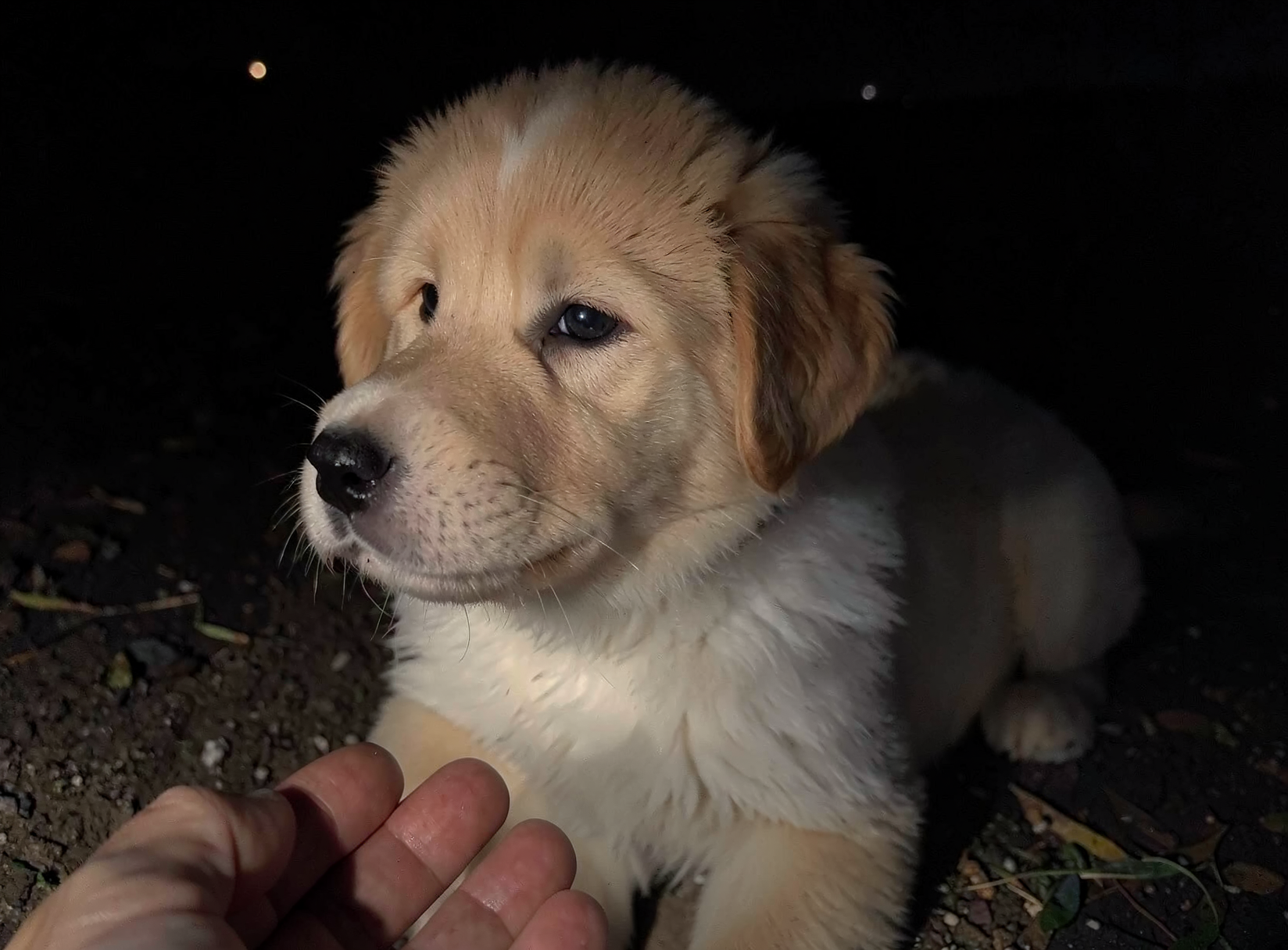
Edit from an initial reference image
You can provide an input image and prompt the model to modify it
MODEL='RunPod/FLUX.2-klein-4B-mflux-4bit'
mflux-generate-flux2-edit \
  --model "$MODEL" \
  --image-path IMG_4370.jpg \
  --prompt "Change it to a puppy in the night" \
  --steps 4 \
  --seed 42 \
  --output edit-output.png
Note this may take a few minutes and at least 12GB of RAM
More Image Resources
https://huggingface.co/black-forest-labs/FLUX.2-klein-4B - Klein 4 Billion parameters is the fast distilled model
Quantized and MLX specific (aka runs fast on apple silicon): https://huggingface.co/Runpod/FLUX.2-klein-4B-mflux-4bit
More details on the image model family from Black Forest Labs: